
Reports. Decisions. Results.
Google Search Console Report
Search performance report delivered directly to your inbox.
Know how people find you on Google: which searches bring them to your site, which ones are dropping, and where to focus next to grow your organic traffic.
Available from the Lite plan. Set up from your Board. Built on top of Google Search Console
Sponsored by

Trusted by teams at Google, Airbnb, Stripe, IKEA, Nestlé and dozens more global brands.
Start receiving automated search performance reports directly in your inbox.

Set up from your Board
Available from the Lite plan onwards
Connect a single Search Console property or several of them, each one set up as its own report, with its own recipients and its own schedule: daily, weekly or monthly. You can also send it as a One Time Report when you only need a single snapshot.
Every report lands direct in your inbox, covers the period you choose and compares it with the one before, so the numbers turn up with context already attached and nobody has to log in to a dashboard to read them.
Subscribe from your BoardNot on a paid plan yet? Compare all plans
I love having a weekly reminder of the Web Performance of my site, as another checkpoint that I’m not letting things regress, Also look forward to the featured links in case I missed anything in the webperf world in the last week.
WPR provides an easy way for me to observe and share simplified performance monitoring results with other engineers. Compared to other solutions, WPR just gets to the point with the data you need.
A snapshot report that provides valuable insights to help you focus on your website’s performance, based on data, makes it a worthwhile choice, especially considering such factors influence SEO.
About WebPerformance Report
WebPerformance Report is a reporting service. It gathers data from the tools you already trust and turns it into a clear report delivered to your inbox, on your schedule. Free to start, no dashboard to keep checking.
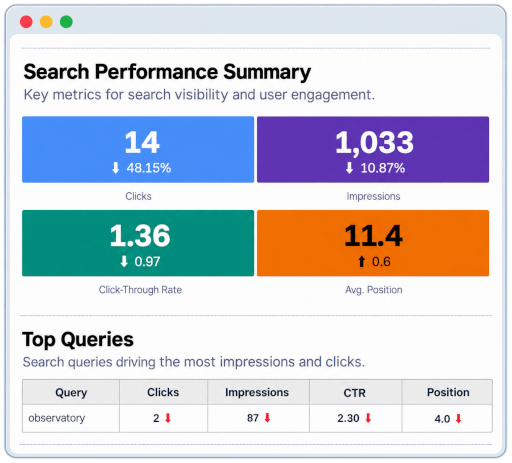
The Google Search Console Report shows clicks, impressions, CTR and average position from your Search Console property next to the previous period, for your top queries, countries, devices and pages, so a query slipping down the results shows up while you can still act on it.
See the search reportWhere the data comes from
Google Search Console is Google’s free service for site owners. It shows how Google Search sees your site: which pages are indexed, which queries they appear for and how often people click through. For most teams it is the only first-party source of organic search data.
It keeps up to 16 months of search data and connects with Google Analytics 4.
Explore Google Search ConsoleWe are really proud that teams at big companies and brands around the world read their WebPerformance Report every week, right from their inbox. 🎉




































Five reports, one subscription. Pick the ones that matter to your site. Each has its own recipients and schedule.
WebPageTest Report
The gold-standard open-source performance tool. Core Web Vitals, filmstrip, request map.

HTTP Observatory Report
Mozilla’s in-depth assessment of your HTTP headers and security configuration.

WAVE Report
The accessibility barriers on your pages, checked against standards such as WCAG, ADA and the EU Accessibility Directive.

GA4 Report
Your traffic numbers set against the period before, so a channel drying up shows up while you can still act on it.

Search Console Report
Impressions, clicks, positions and the queries bringing visitors in from organic search.
Want all five?
Every report type is unlocked on the paid plans, each with its own URLs, recipients and schedule.
See PlansSearch is often how people find you for the first time, and when a query or a page drops in the results, fewer of them get there. Every report shows your clicks, impressions, CTR and position next to the previous period across the five areas below, so you can see what is gaining ground, what is dropping and where to focus next.
-
Performance summary
Clicks, impressions, click-through rate and average position, each with the change against the previous period.
-
Top queries
The searches that bring people to your site, with clicks, impressions, CTR and position for each, so you can see which are gaining ground and which are dropping.
-
Top countries
Where your search traffic comes from, so you can see which markets are growing in the results.
-
Device category
How your search performance splits across devices, and whether one starts earning clicks differently from the rest.
-
Top pages
The pages that earn the most search traffic, so you can tell which content Google is sending people to.
Get in touch: info@webperformancereport.com

Reports. Decisions. Results.
(stable version 😊)